
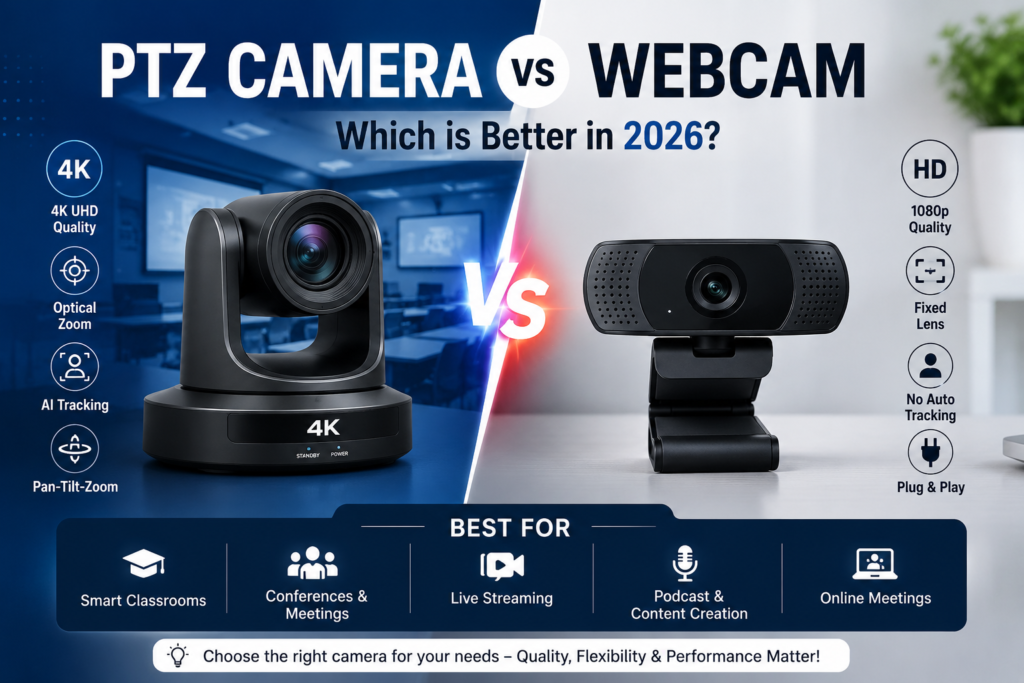
PTZ Camera vs Webcam: Which is Better in 2026?
PTZ Camera vs Webcam is one of the most common comparisons for businesses, educators, content creators, and organizations looking to improve their video communication setup in 2026. Both camera solutions serve different purposes, but understanding their features, performance, and use cases can help you choose the right option for your needs.
As hybrid learning, online meetings, live streaming, podcasting, and content creation continue to grow, selecting the right video equipment has become more important than ever. While webcams are popular for personal use and small meetings, PTZ Cameras offer professional-grade video quality, advanced zoom capabilities, AI tracking, and remote operation.
What is a PTZ Camera?
A PTZ (Pan-Tilt-Zoom) Camera is a professional video camera that can remotely move left, right, up, down, and zoom in or out. These cameras are commonly used in smart classrooms, conference rooms, podcast studios, houses of worship, surveillance systems, and live streaming environments.
Modern PTZ cameras support AI-powered auto tracking, 4K video resolution, optical zoom, multiple connectivity options, and seamless integration with video conferencing platforms.
What is a Webcam?
A webcam is a compact camera typically connected directly to a computer through USB. Webcams are commonly used for video calls, online meetings, virtual classes, and personal live streaming.
Most webcams provide plug-and-play functionality, making them affordable and easy to use. However, they generally offer limited zoom, fixed viewing angles, and lower flexibility compared to PTZ cameras.
PTZ Camera vs Webcam: Key Differences
| Feature | PTZ Camera | Webcam |
|---|---|---|
| Video Quality | Full HD / 4K | HD / Full HD |
| Zoom Capability | Optical Zoom | Digital Zoom |
| Remote Control | Yes | No |
| AI Tracking | Available | Limited |
| Professional Streaming | Excellent | Basic |
| Large Room Coverage | Yes | No |
| Conference Rooms | Ideal | Limited |
Benefits of PTZ Cameras
- Professional 4K video quality
- AI-powered speaker tracking
- Remote pan, tilt, and zoom control
- Suitable for large rooms and auditoriums
- Perfect for live streaming and broadcasting
- Supports hybrid learning environments
- Better audience engagement during presentations
- Multiple preset viewing angles
For educational institutions, PTZ cameras work exceptionally well with Digital Boards and Interactive Flat Panels to create fully integrated smart classrooms.
Benefits of Webcams
- Affordable pricing
- Easy plug-and-play setup
- Compact and portable design
- Suitable for personal use
- Good for small online meetings
- Ideal for home offices
PTZ Camera vs Webcam for Smart Classrooms
Smart classrooms require flexible camera movement, clear visibility, and professional recording capabilities. PTZ cameras provide complete classroom coverage, allowing teachers to move freely while remaining visible to remote students.
Educational institutions increasingly prefer PTZ cameras because they integrate seamlessly with Interactive Flat Panel Solutions and modern digital learning platforms.
In comparison, webcams are limited to fixed positions and cannot effectively cover larger classrooms or lecture halls.
PTZ Camera vs Webcam for Video Conferencing
Businesses conducting board meetings, corporate training sessions, and client presentations benefit significantly from PTZ cameras. Their ability to automatically track speakers and adjust viewing angles creates a more engaging meeting experience.
For small teams or individual professionals, webcams may be sufficient. However, organizations seeking professional video communication should consider upgrading to PTZ camera solutions.
PTZ Camera vs Webcam for Podcasting and Live Streaming
Podcast creators and streamers often require professional video production quality. PTZ cameras provide smooth movement, multiple camera presets, and cinematic zoom effects that enhance audience engagement.
For advanced podcast production setups, pairing PTZ cameras with Professional Microphones creates a complete content creation environment.
You can also explore our guide on Podcast Studio Setup Ideas for additional recommendations.
Which Camera Should You Choose?
Choose a Webcam if:
- You need an affordable solution.
- You attend personal video meetings.
- You work from home.
- You require a simple setup.
Choose a PTZ Camera if:
- You manage smart classrooms.
- You conduct professional conferences.
- You host webinars and live streams.
- You create video content regularly.
- You need AI tracking and optical zoom.
- You require professional video quality.
Why Choose Balaji LNS IT Solutions?
At Balaji LNS IT Solutions, we provide complete smart classroom, conference room, podcast studio, and professional video solutions. Our range includes high-performance PTZ Cameras, Interactive Flat Panels, Digital Boards, professional microphones, and integrated AV systems.
Whether you are upgrading a classroom, setting up a conference room, or building a podcast studio, our team can help you select the right technology solution.
Conclusion
When comparing PTZ Camera vs Webcam in 2026, the best choice depends on your requirements. Webcams are suitable for basic communication needs, while PTZ cameras deliver professional-quality video, advanced tracking features, and superior flexibility for classrooms, conferences, live streaming, and content creation.
Explore our complete range of PTZ Camera Solutions or Contact Us today to find the ideal video solution for your organization.